Email Infrastructure & Deliverability
Email infrastructure is the foundation of every cold outbound system. If your emails land in spam, nothing else matters — not your copy, not your offer, not your targeting.
Why Infrastructure Matters Now
SPF, DKIM, and DMARC are no longer optional. As of February 2024, Gmail and Yahoo enforce authentication on all bulk senders. Google will block messages from domains that fail these checks, and any domain that exceeds a 0.1% spam complaint rate risks permanent deliverability damage.
Cold outbound lives on the edge of these thresholds. One misconfigured domain, one aggressive warmup ramp, one batch of bad data — and your entire sending infrastructure can be burned. The goal is simple: land in the primary inbox, every time, at scale.
Domain & Inbox Configuration
Never send cold email from your primary domain. Purchase dedicated sending domains — 10 to 15 .com domains that are variations or abbreviations of your brand. Set up 2-3 inboxes per domain and cap each inbox at 30-50 emails per day. This distributes risk and keeps per-inbox volume well below spam thresholds.
Sending Volume by Setup Size
| Setup | Domains | Inboxes | Emails/Day/Inbox | Daily Volume | Monthly Volume |
|---|---|---|---|---|---|
| Starter | 5 | 10 | 30 | 300 | ~6,000 |
| Standard | 10 | 25 | 40 | 1,000 | ~20,000 |
| Scale | 15 | 40 | 50 | 2,000 | ~40,000 |
Email Provider Split
Split your inboxes across multiple providers to avoid single-point-of-failure. If Google suspends one workspace, your Microsoft inboxes keep sending. Most operators run a 60/40 or 50/50 split.
Email Providers
| Provider | Cost | Reputation | Best For |
|---|---|---|---|
| Google Workspace | $7/user/mo | Highest | Primary sending — best deliverability to Gmail recipients |
| Microsoft 365 | $6/user/mo | High | Secondary sending — strong with enterprise/Outlook recipients |
| Mailforge | $3/mailbox/mo | Moderate | Budget scaling — bulk domain creation and inbox provisioning |
Warmup Schedule
New inboxes have zero reputation. Warmup tools send and receive emails between a pool of inboxes, generating opens, replies, and positive engagement signals. This builds sender reputation gradually before you introduce cold sends.
28-Day Warmup Ramp
| Period | Warmup Emails/Day | Cold Emails/Day | Total/Day | Notes |
|---|---|---|---|---|
| Days 1-7 | 3-10 | 0 | 3-10 | Warmup only. Do not send any cold email. |
| Days 8-14 | 10-15 | 0-5 | 10-20 | Introduce 2-5 cold sends if engagement is strong. |
| Days 15-21 | 15-20 | 10-15 | ~30 | Gradually shift volume toward cold. Monitor bounce rate. |
| Days 22-28 | 15-20 | 20-25 | ~40 | Approaching target volume. Keep warmup running. |
| Day 29+ | 10-15 | 30-40 | 40-50 | Steady state. Never turn warmup off entirely. |
Sending Platform Comparison
Your sending platform manages inbox rotation, warmup, sequences, and deliverability monitoring. The market has consolidated around a few major players.
Cold Email Sending Platforms
| Platform | Starting Price | Email Accounts | Built-in Warmup | A/B Testing | Standout Feature |
|---|---|---|---|---|---|
| Instantly | $37/mo | Unlimited | ✓ | A/Z testing on $97 plan | Largest warmup pool, Deliverability Dashboard |
| Smartlead | $39/mo | Unlimited | ✓ | A/B on all plans | Sub-sequence logic, advanced rotation |
| Lemlist | $55/user/mo | 3/user | ✓ | ✓ | Native LinkedIn + email multichannel |
| Woodpecker | $20/mo | Unlimited | ✓ | ✓ | Agency-friendly, client management |
| Saleshandy | $25/mo | Unlimited | ✓ | ✓ | Unified inbox, sender rotation |
Technical Authentication Setup
Every sending domain needs three DNS records configured correctly. These authenticate your emails and tell receiving servers your messages are legitimate.
v=spf1 include:_spf.google.com include:spf.protection.outlook.com ~all; Generated by your email provider — add as a TXT record
; Host: google._domainkey.yourdomain.com
; Value: v=DKIM1; k=rsa; p=MIIBIjANBgkqh...; TXT record at _dmarc.yourdomain.com
v=DMARC1; p=none; rua=mailto:dmarc@yourdomain.com; pct=100 Custom tracking domain: Configure a custom tracking domain (e.g., track.yourdomain.com) in your sending platform. This replaces the shared tracking domain, which is often blocklisted, and improves deliverability.
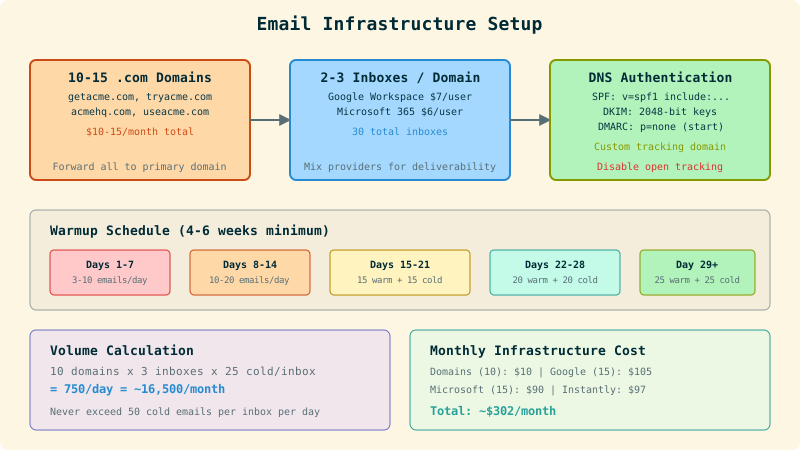
Infrastructure Cost Breakdown
A standard 10-domain setup with 25 inboxes runs approximately $300/month. This is the non-negotiable foundation cost.
Monthly Infrastructure Costs (Standard Setup)
| Item | Quantity | Unit Cost | Monthly Cost |
|---|---|---|---|
| Domains (.com) | 10 | $10/yr each | $8/mo amortized |
| Google Workspace inboxes | 15 | $7/mo | $105/mo |
| Microsoft 365 inboxes | 10 | $6/mo | $60/mo |
| Instantly (Growth plan) | 1 | $97/mo | $97/mo |
| Custom tracking domains | — | Included | $0 |
| DNS/Cloudflare | — | Free tier | $0 |